
A new site has no local operations stack. How quickly can it become useful?
Enroll the appliance, import its protected bootstrap material, confirm prerequisites, and initialize a known base runtime before selecting apps.
Capability
Bring up a known local runtime, add only the catalog apps you need, and use the same lifecycle for additional packaged runtimes.
Enrolled appliance
Encrypted bootstrap path
Managed app catalog
Schema-guided configuration
Operational need
The team gets a practical local platform whose bootstrap, selected apps, current health, changes, and failures stay visible instead of becoming a bespoke infrastructure project.
Operating signals
What you get
Where it starts
These examples enter the product surface that owns their state. They do not all become a case, ticket, owner, or shared evidence record automatically.
Enroll the appliance, import its protected bootstrap material, confirm prerequisites, and initialize a known base runtime before selecting apps.
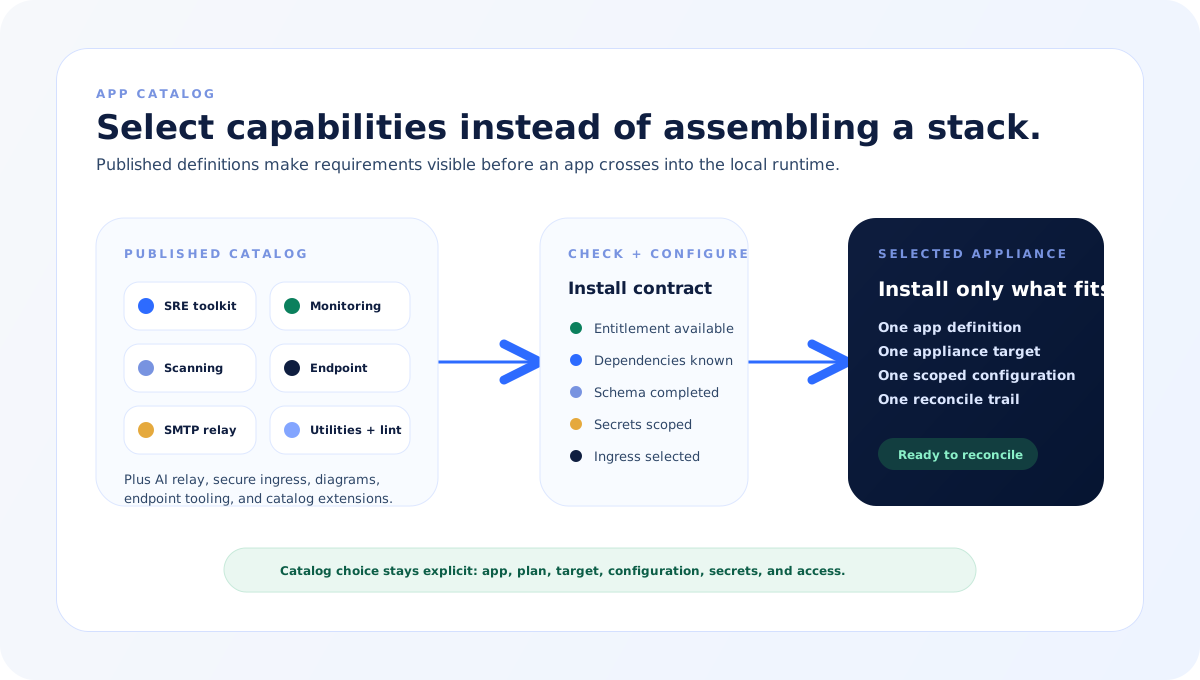
Browse the catalog with categories, dependencies, and configuration requirements visible before installation.
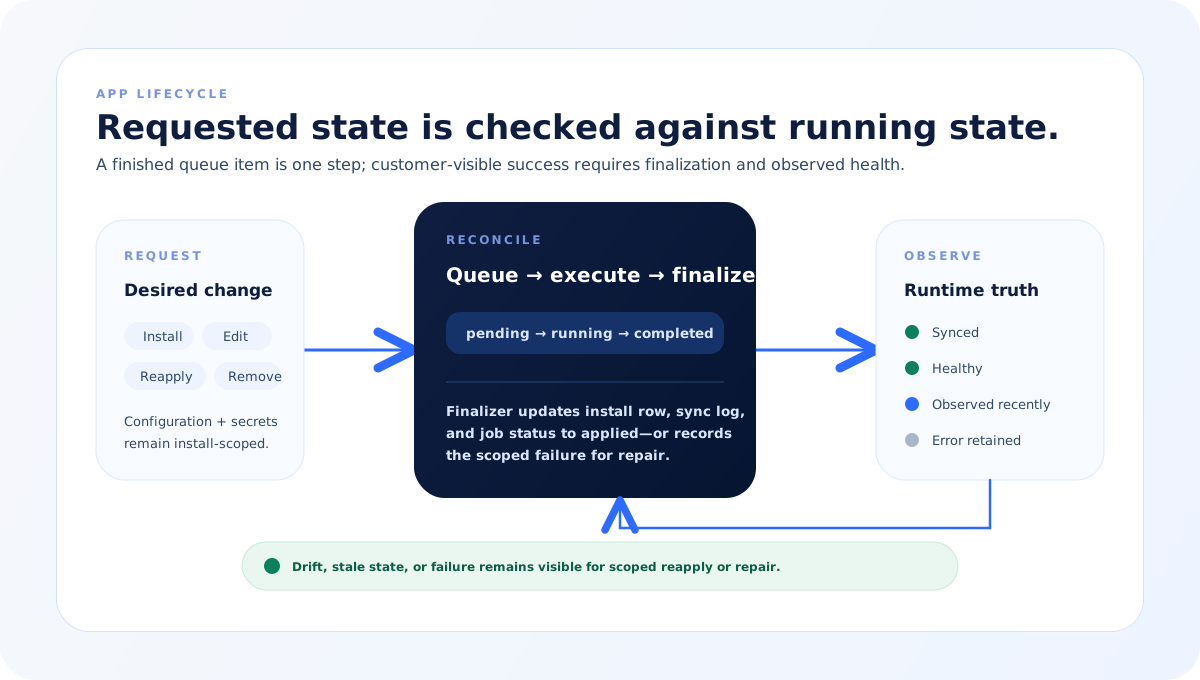
Compare the install state with observed synchronization, health, freshness, and any retained error instead of treating a completed job as proof.
Edit schema-guided configuration and scoped secrets, reapply through reconciliation, or remove the install from the same appliance record.
Choose from the SRE toolkit, relays, diagram and lint services, monitoring, vulnerability, endpoint, and security apps included in the catalog.
Keep appliance releases, app desired state, observed health, reconciliation, and failure context on explicit product paths.
Package it through the app lifecycle with a configuration schema, installation path, ingress requirements, reconciliation, and health checks.
How it works
The product path below names its inputs, decisions, controls, and output without implying the same lifecycle applies to every capability.
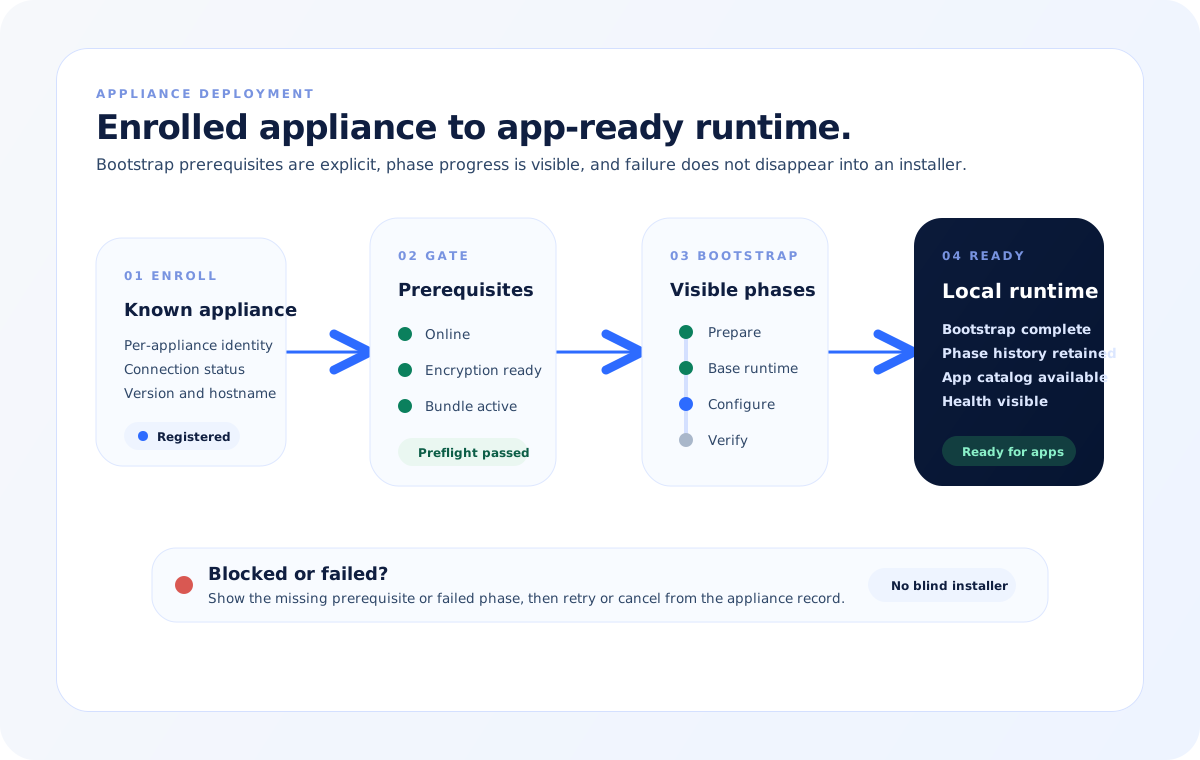
Register the local runtime so its identity, connection state, version, and target environment are visible.
Confirm the appliance is online, encryption is ready, and its protected bootstrap bundle is present before initialization.
Select the required apps and provide their schema-guided configuration and scoped secrets.
Apply the requested state through the queue, then compare install status with observed synchronization and health.
Use app output in wider workflows, reapply or remove apps when needed, and keep the appliance on a known release path.
Product model
The diagrams show how an appliance moves from enrolled hardware to a protected base runtime, how catalog apps cross into the local environment, and how desired configuration stays separate from observed health.
Appliance deployment
Bootstrap begins only after the appliance is online, encryption is ready, and its protected bundle is present. Phase status and errors stay visible until the local runtime is ready for catalog apps.
App catalog
Catalog apps carry dependency, configuration, secret, ingress, and deployment requirements. Operators choose only what the appliance needs.
App lifecycle
Install, edit, reapply, and removal flow through reconciliation. The product shows requested install state beside observed synchronization, health, freshness, and retained errors.
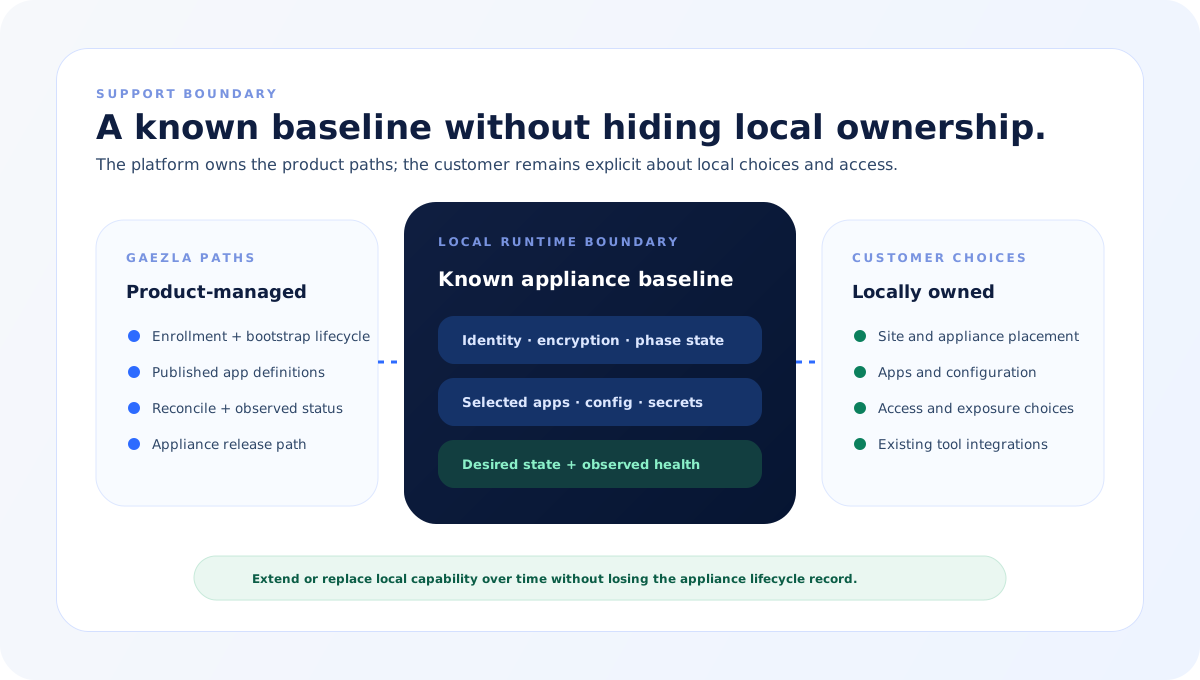
Support boundary
The platform supplies the appliance lifecycle, catalog definitions, and reconcile path. The customer still chooses sites, apps, configuration, access, and where existing integrations replace or extend local capability.
What it includes
These parts participate in the workflow. The record shows what was used and why it mattered.
Local appliance
An enrolled runtime exposes connection, version, bootstrap, health, and lifecycle state from one appliance record.
Appliance inventory, bootstrap, health, and release surfaces
Protected bootstrap
Initialization requires an online appliance, encryption readiness, and a valid per-appliance bootstrap bundle before phases can begin.
Encryption configuration, sealed bundle, preflight, and phase log
App catalog
Catalog entries include category, dependencies, ingress, required capabilities, and configuration schemas; the same contract can carry additional packaged runtimes.
Catalog browser and app detail
App configuration
Operators use app-specific schemas for configuration and manage secrets on the scoped install instead of maintaining ad hoc manifests.
Install wizard, schema forms, secrets, and ingress policies
Reconciliation
Install, update, reapply, and removal create visible work whose finalizer connects queue completion to the requested app state.
Install records, sync jobs, queue, and reconcile log
Observed runtime state
Synchronization, health, observation time, and retained errors show whether requested state matches what is actually running.
Deployment sync, runtime health, freshness, and repair status
Control model
Integrations, AI assistance, routines, and agents use different permissions and records. The controls below describe this capability rather than a universal approval model.
Bootstrap cannot start until appliance identity, online state, encryption, and bundle prerequisites are satisfied.
App selection keeps dependencies, required capabilities, and configuration requirements visible before install.
Configuration and secrets are scoped to the selected app install and applied through reconciliation.
A completed execution is not presented as customer-visible success until finalization records the requested change as applied.
Desired install state and observed synchronization and health remain separate so drift and stale observations stay visible.
A local runtime is packaged, configured, and installed as an app so its deployment and health remain governed alongside its API capability.
Value over time
Bootstrap
Configure
Operate
Next step
Book a walkthrough and I will map this workflow to the integrations and controls you already use.